
Clip Tools for Multi-Show Podcast Networks

For a podcast network running several shows, buy on four things a single-show buyer never thinks about: one account that holds many distinct show brands, per-show brand kits you can lock so producers can't drift, a budget you pool and report on across shows, and pricing that gets cheaper per show as you add shows. No clip tool today does all four well. Plan for a small stack, not one product.
That last sentence is the part most "best tool for networks" lists skip. A network is not a bigger solo creator and it is not an agency billing clients. It is one operator running a portfolio of separate brands that share a back office. The buying question is not "which tool makes the best clip", most modern tools surface roughly 80% of the same moments. The question is which setup lets you run twelve shows without twelve separate logins, twelve invoices, and twelve people each inventing their own caption style.
This guide gives you a scorecard to grade any tool on network fit, the honest gap in the market, and a cost-per-show table at 4, 12, and 20 shows using pricing verified in June 2026.
What makes a clip tool right for a podcast network?
A clip tool fits a network when one account can hold many separately-branded shows, each show locks its own brand kit, credits and seats are pooled and reportable across shows, and the bill scales sub-linearly as you add shows. Detection quality matters less here, workflow and governance at portfolio scale are the deciding factors.
Run the math on what scale actually changes. One 60-minute episode yields enough 30–90-second moments for a week or two of posts, and networks routinely cut a single episode into dozens of variations distributed across many accounts at once (Conbersa, vendor-sourced, June 2026). Twelve shows publishing weekly is roughly 50 episodes a month feeding hundreds of clips across platforms. The tool stops being an editor and becomes infrastructure. Infrastructure is judged on consistency, governance, and unit cost, not on whether one clip looks good.
Clips earn the investment: short-form drives an estimated 20–40% of new audience for video shows and can lift reach 2–5× (Podcast Studio Glasgow). Multiply that across a portfolio and the clip program becomes the network's main discovery engine. Which is exactly why you cannot let it run as twelve disconnected hobby setups.
The 5-axis Network Readiness scorecard
Score any tool 0–2 on each axis (0 = absent, 1 = partial, 2 = built for it). A tool scoring 8+ runs a network cleanly. Below 5 and you will rebuild the missing pieces in spreadsheets and Slack.
Here is why each axis earns its place.
Account architecture. The dividing line between a network setup and a multi-seat team setup is whether one account holds many distinct brands. Most clip tools give you one workspace; some give you "team workspaces" but treat all members as collaborators on one shared brand. A network needs the inverse: shared people, separated brands. Networks formalize this with tiered account structures, a network-level account, a hero account per show, host-personality accounts, and theme accounts that absorb clip variations (Conbersa). Your clip tool has to map onto that, not fight it.
Per-show branding. A network's value is that each show feels like its own thing. The caption style on your true-crime show should never appear on your business show. The axis is not "does it have brand kits" but "can each show have its own locked kit a producer cannot accidentally override." Lockable beats merely available.
Pooled budget and seats. A network has one finance owner and many producers. If billing is per-show, you get twelve invoices and no way to shift unused credits from a quiet show to a busy one. Pooling is an accounting feature disguised as a product feature, and it is the one finance will care about most.
Centralized reporting. Most clip tools report on creation, clips made, minutes used, and stop there. Almost none roll up performance across shows, and most hosting analytics ignore off-platform clip results entirely. There is no single 2026 product that combines multi-show clip generation with unified cross-show clip analytics; networks build that layer separately. Saying so is the honest part competitors skip.
Volume pricing. The whole economic case for a network is that fixed costs spread. A 30-account portfolio per show typically runs at 3–5× the cost of a single account, not 30×, because labor is largely fixed (Conbersa). Your tooling should behave the same way. A model that charges you twelve full subscriptions for twelve shows is the wrong model at this scale.
How the main tools score on network fit
Here is the honest grading. Pricing verified June 2026 on each vendor's page; re-check before you commit, because these change often.
| Tool | Account & branding fit | Pricing model at network scale |
|---|---|---|
| Opus Clip | Pro adds a team workspace (owner + 2 seats base, expandable to 6 via two add-on packs) and multiple brand templates; Business adds up to 5 shared brand templates, API and unlimited seats. (Opus) | $29/mo Pro, then Business sales-led once you pass ~6 seats/900 min or need API. Not pooled-multi-brand below Business. |
| Vizard | Creator manages one workspace; Business adds a shared workspace, brand kit, custom fonts and external/client project access for agencies running several brands. (Vizard) | Creator $29/mo ($14.50/mo annual), Business $39/mo ($19.50/mo annual), with team seats on Business. Per-seat, not per-show. |
| Riverside (Magic Clips) | Business tier offers production workspaces, custom roles and unlimited studios, the strongest native multi-show structure here. (Riverside) | Pro $24/mo (annual); Business custom, sales-led. |
| QuickReel | Ultimate gives a 10-seat team workspace, unlimited brand templates and scheduling to up to 30 destinations; lower tiers and a free signup to test first. (QuickReel) | $89/mo Ultimate promo (renews $99; 10 seats, 1,000 pooled credits); custom for larger networks. |
Two patterns fall out of that table. First, every tool with real multi-brand structure pushes you to a sales-led tier once you pass a handful of shows, Opus Clip's Business plan is where you go once you exceed roughly six seats, run out of processing minutes, or need API access (Opus help docs), and Riverside's multi-workspace structure lives only on Business (Riverside). Second, per-seat models (Vizard's Business tier scales by team seats) and per-show subscriptions both make your bill climb roughly in step with show count, while pooled-credit plans let one pool absorb several shows, the way a network's economics actually work.
For context, the market leader sets the bar on scale, not on price: Opus Clip reported a $215M valuation and 10M+ users in March 2025 (Sacra). Scale of adoption is real. It does not make the seat cap on Pro disappear.

What network-scale pricing actually costs per show
The model matters more than the headline price. A seat-capped tool forces a new subscription roughly every few shows once you exhaust seats; a pooled-credit tool lets one plan cover many shows until you run out of credits. Below is the per-show monthly cost as a network grows, using verified June 2026 list pricing and assuming each show needs roughly one episode's worth of credits per week.
The shape is the point, not the exact dollar. On a per-show or seat-capped model, your cost per show barely moves as you scale, so a 20-show network pays roughly twenty times a single show. On a pooled plan, QuickReel's Ultimate lists at $89/mo for 10 seats and 1,000 credits (QuickReel), those credits spread across shows until you exhaust them, then you add capacity. That is the network economics working in your favour. Past the point where one pooled plan runs dry, every vendor moves you to a custom tier; that is the moment to negotiate volume pricing in writing.
One honest caveat on the chart: it assumes even credit burn. A network with two heavy daily shows and ten light weekly ones will skew the math, and a seat-capped tool can occasionally win for a tiny network of three near-identical shows run by one person. Model your own episode volume before trusting any chart, including this one.
When to choose each setup
There is no single winner for every network. Choose by where your real constraint sits.
- Choose Opus Clip when clip detection on interview-format shows is your priority and your network stays inside Pro's six-seat ceiling, and you accept a sales call to Business for multi-brand at scale, API or more seats (Opus help docs).
- Choose Vizard when per-brand client access matters and you are comfortable paying per added seat; its Business tier adds a shared workspace, brand kit and external/client project access for managing several brands (Vizard).
- Choose Riverside when your shows record on Riverside already and you want recording, magic clips, and multiple production workspaces with custom roles under one Business roof (Riverside).
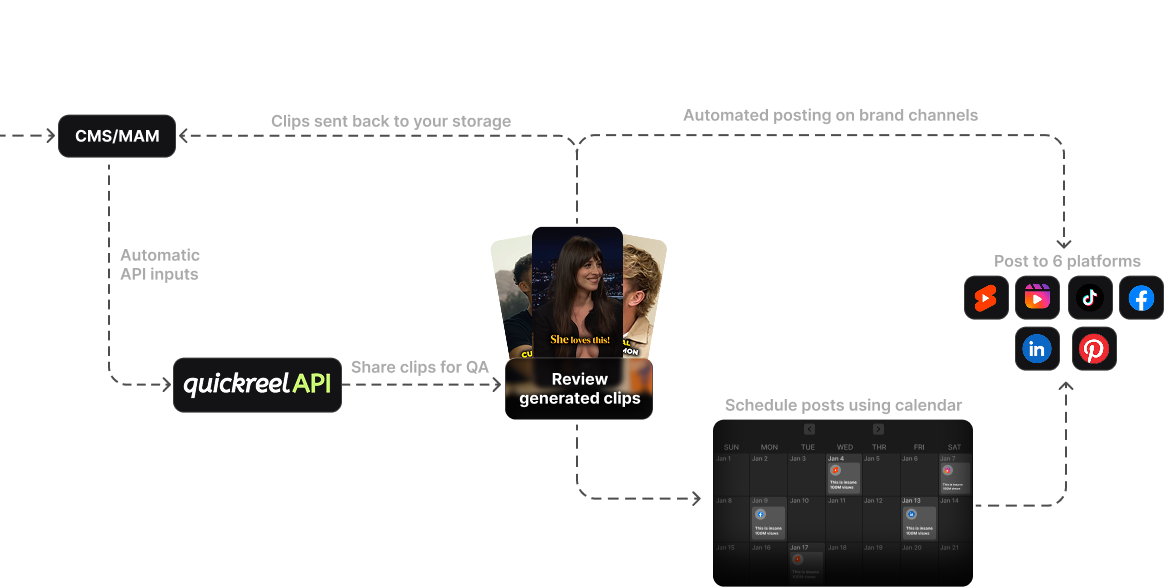
- Choose QuickReel when you want pooled credits across shows, unlimited per-show brand templates, scheduling to many destinations, and a low-cost on-ramp from a $9 Starter up to the 10-seat Ultimate, without a sales call to start (QuickReel).
Whatever you pick, plan to pair it with a separate reporting layer, because no clip tool rolls up cross-show clip performance yet. And budget for the reality that AI clips still need a human pass before they post, a mis-cut moment here, a caption error there. At network scale that review is a staffed process, not an afterthought.
If your structure is closer to billing external clients than running owned shows, read choosing a podcast clip tool for an agency instead, the governance overlaps but the billing model differs. If you are deciding mainly on seat count, what multi-seat teams should compare goes deeper on that one axis, and for a head-to-head of the leading tools see our best Opus Clip alternatives. For the scored tool roundup that pairs with this buying guide, see the best clip tools for podcast networks.
Frequently asked questions
Can one account run several podcast shows with separate branding? On most clip tools, only partly. Team workspaces usually share one brand; true per-show locked branding under one login is a higher-tier or sales-led feature on Opus Clip, Vizard and Riverside, while QuickReel's upper tiers include unlimited per-show brand templates in one workspace. Confirm "lockable per-show kit" specifically before buying.
Is there a clip tool with centralized analytics across all shows? Not as a single product in 2026. Clip tools report on what you created, clips, minutes, but cross-show performance reporting lives in a separate analytics layer, and most hosting analytics ignore off-platform clip results. Plan to build or buy reporting alongside your clip tool, not inside it.
How much does a clip tool cost for a 12-show network? It depends entirely on the pricing model. A pooled-credit plan such as QuickReel's $89/mo Ultimate can cover several shows from one credit pool until it runs dry; per-seat or per-show models scale closer to linearly, so a 12-show network can pay several hundred dollars a month. Past one pooled plan, every vendor moves you to custom volume pricing.
Do podcast networks still need human editors if they use AI clipping? Yes. Every AI clipper still needs a human pass before posting, fixing a mis-cut moment, a caption error, a bad crop. At network scale that review becomes a defined role, not a stolen afternoon. Treat AI clipping as an accelerant that multiplies a small team, not a replacement for one.
Should a network buy one tool or build a stack? Build a small stack. The cleanest setup is one clip tool with pooled credits and per-show branding, one scheduling layer (sometimes the same tool), and one reporting layer that rolls up performance across shows. Trying to force one product to do all three is how networks end up with twelve disconnected workflows.