
Choose a Clip Tool by How You Actually Work

Pick a clip tool by the shape of your week, not by who has the longest feature list. The four most common podcast workflows each break on a different capability: batch-weekly needs queue speed, livestream-to-clip needs long-source handling, interview-heavy needs multi-speaker reframing, and back-catalog needs bulk throughput and credit value. Match that one capability first; everything else is secondary.
Detection quality across the major AI clippers has mostly converged, run the same episode through QuickReel, Opus, and Vizard and you get overlapping shortlists of the same standout moments, not wildly different ones. So a feature-by-feature spec war tells you almost nothing about which one will actually fit your Tuesday. Your workflow does. This guide maps four real workflows to the capability each one lives or dies on, then to the tools that deliver it, with pricing verified live on 27 June 2026.
Why workflow beats feature list
Workflow beats feature list because a capability only matters if your workflow actually exercises it. Two shows can buy the same tool and have opposite experiences: a solo host posting one episode a week barely touches the pricing ceiling, while a network clipping a 400-episode archive hits it in an afternoon. The tool didn't change. The workflow did. Match the capability your week leans on hardest, and the spec sheet sorts itself out.
This is why most "best clip tool" lists are weak. They rank tools on a flat scorecard, captions, reframe, languages, price, as if every buyer loads them the same way. The buyer who reads twelve caption styles as a win is a different buyer from the one who needs to clip a three-hour livestream before it cools off. Rank for the second buyer and the first one gets bad advice.
The honest baseline before we map anything: no AI clipper ships a hands-off button. Every tool's output needs a human review pass, re-cropping a face, trimming a clip that ends mid-sentence, fixing a caption typo, before it goes live. What changes by workflow is where the manual work lands and how much the tool's structure adds to it.
The four workflows, mapped to the capability each needs
1. Batch weekly: you need queue speed and built-in scheduling
You record one episode, sit down once, and want a week of posts out the door before you stand up. The make-or-break capability is the number of clicks between a URL and a posted clip, including scheduling, because re-exporting and re-uploading to each platform is where batch days quietly lose an hour.
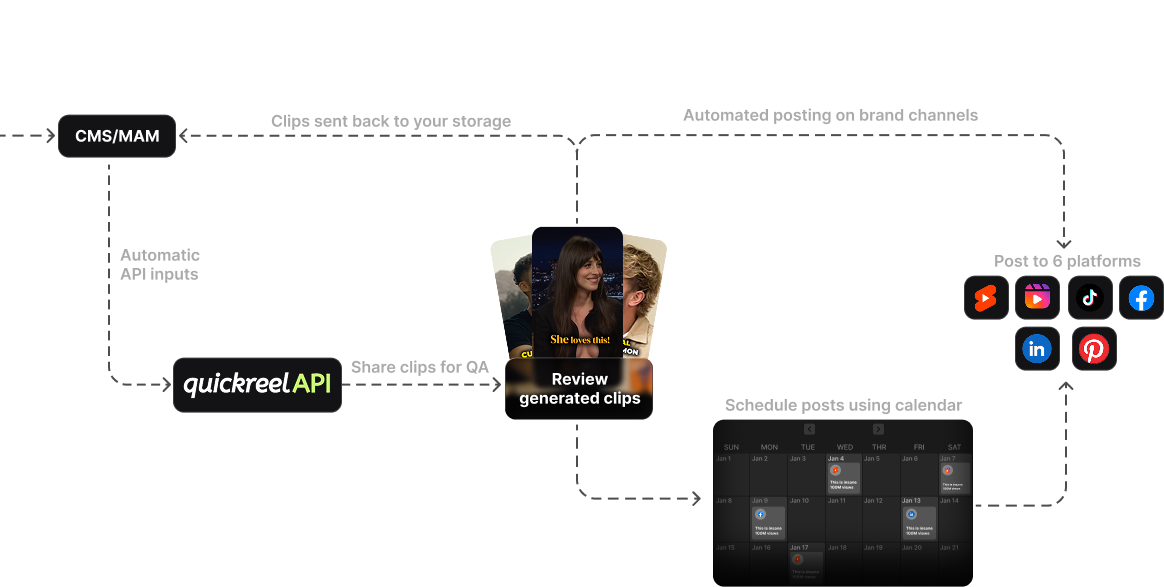
Tools that schedule natively win here. QuickReel pastes a YouTube link, returns captioned vertical clips, and schedules them across platforms without leaving the tool, Pro connects 6 platforms, Pro+ 10, Ultimate 30 (QuickReel pricing). That removes the per-platform upload-and-caption touch entirely. Opus Clip finds and scores clips cleanly, but social scheduling and multi-platform auto-posting are gated to its $29 Pro tier, the $15 Starter only does basic manual posting, so a batch day on Starter usually means clipping in Opus and scheduling somewhere else (Opus Clip pricing). For a weekly batcher, that extra hop is the difference between one sitting and two.
The stakes are not abstract. About 47% of podcasts stop at three episodes or fewer, the classic podfade pattern (Amplifi Media analysis). Publishing consistency is the strongest thing separating shows that survive from those that don't. A batch workflow exists to make consistency cheap. A tool that adds clicks works against the one thing the workflow is for.
2. Livestream to clip: you need long-source handling
You go live for two or three hours, the moments are time-sensitive, and you want clips out while the conversation is still warm. The capability that matters is handling a long source without choking or bleeding credits, and metering that doesn't punish you for a three-hour upload.
This is where the pricing model matters more than the price. Most AI clippers, QuickReel, Opus, Vizard, meter by source minutes (1 credit ≈ 1 minute in). A three-hour livestream is 180 minutes, so it eats a credit pool fast on small plans. Read the credit math against your stream length before you buy: QuickReel's Pro gives 250 credits/mo, Pro+ 500, Ultimate 1,000 (QuickReel pricing); a weekly two-hour stream is ~480 minutes a month, which puts you at Pro+ or above. Upload-metered tools like Klap count videos rather than minutes, so one long upload eats one slot instead of 180 credits, but watch the per-video length cap, which is 45 minutes on Klap's $28 Basic and only reaches 3 hours on the $188 Pro+ tier (Klap pricing). The upload model favors few long sources in principle; the length cap decides whether your stream actually fits the plan you were eyeing. Same tool, opposite verdict by workflow.
3. Interview-heavy: you need speaker-aware reframing
Two or more people, lots of back-and-forth, and a horizontal recording you need to turn vertical without cutting off whoever is talking. The capability is multi-speaker reframing that tracks the active speaker, auto-reframe that follows the conversation instead of locking on one face or the empty middle.
Almost every tool advertises auto-reframe; the spread is in how it handles two faces. The honest test is to run one real two-person clip and watch whether the frame follows the talker. QuickReel, Opus, and Vizard all do speaker tracking; the difference shows up on rapid cross-talk and three-plus-person panels, where reframing gets jumpy and you spend review time fixing crops. Budget for that review pass regardless of tool, interviews are the workflow where the human cleanup lands hardest, because a mis-tracked face that cuts off the person talking is far more visible than a soft caption. If your interviews are panels, weight reframing quality above price.
4. Repurpose old back-catalog: you need bulk throughput and credit value
You have 50, 200, maybe 400 old episodes and you want clips out of all of them. Volume is the whole game, so the capability is bulk throughput and cost per source minute, the price of one feature matters far less than the price of processing a thousand minutes.
Here the source-minute math dominates everything. A 100-episode archive at 45 minutes each is 4,500 source minutes; on a credit-metered tool that is real money, so the per-credit value and the size of the top plan decide it. QuickReel's Ultimate is 1,000 credits/mo at $89 (QuickReel pricing); a back-catalog project of that size means several months of a top plan or a deliberate batching schedule. Upload-metered Klap caps faster than the price suggests for this workflow, because each old episode is a separate video against the monthly count (Klap pricing). The buyer who reads "best for back-catalog" and the buyer who reads "best for one weekly show" should not land on the same plan.
Side-by-side: which capability each tool leads on
Prices verified live on 27 June 2026; SaaS pricing changes, so re-check each vendor's page before you buy.
| Tool | Entry paid price | Leads on (best-fit workflow) |
|---|---|---|
| QuickReel | $9/mo Starter (100 credits) | Built-in scheduling + low click count, best for batch-weekly; Ultimate ($89, 1,000 credits) suits back-catalog |
| Opus Clip | $15/mo Starter; $29 Pro | Virality scoring to pick clips fast; scheduling gated to Pro, interview/selection-heavy work |
| Vizard | ~$14.50/mo annual Creator | Generous free tier + multilingual, testing and non-English interview shows |
| Klap | $28/mo Basic | Upload-metered (videos, not minutes), favors few long sources, e.g. livestreams |
| 2Short | $9.90/mo Lite | Tight YouTube-URL-to-Shorts path, single-platform batchers |
Sources: QuickReel pricing, Opus Clip pricing, Vizard pricing, Klap pricing, 2Short.
The metering row is the one most buyers miss. Credit-metered tools reward few long sources poorly and many short sources well; upload-metered tools do the reverse. The same $29 buys very different value depending on whether your workflow feeds it one three-hour stream or twenty short episodes.

The honest QuickReel section
QuickReel's best-fit workflow is batch-weekly, and the reason is structural, not magical: it clips, captions, and schedules in one place, so the per-platform upload-and-caption touch, the part that eats batch days, disappears. Starter is $9/mo for 100 credits (1 platform), Pro $17.40 (250 credits, 6 platforms), Pro+ $29.40 (500 credits, 2 seats, 10 platforms), up to Ultimate $89 (1,000 credits, 10 seats, 30 platforms), with 20+ languages and 12+ caption styles (QuickReel pricing). For back-catalog work, Ultimate's 1,000 credits is the lever; for livestreams, do the source-minute math against your stream length first.
What it is not: a frame-accurate timeline editor. If your interview workflow needs multitrack audio repair or precise manual cutting, a dedicated editor still beats it, and Opus Clip's virality scoring is a genuinely better fit if ranking clips is how you decide what to post. And like every AI clipper, QuickReel's output needs a review pass before it ships. The honest pitch is narrow and true: for a batch-weekly show that wants the fewest clicks from URL to posted, it removes the most steps for the least money.
When to choose each, in one line
- Batch weekly: a tool that schedules natively, so one sitting ships the week. QuickReel fits; see the best clip tool setup for solo podcasters.
- Livestream to clip: do the source-minute math; upload-metered pricing can win for few long sources.
- Interview-heavy: weight speaker-aware reframing above price, and budget the review pass.
- Back-catalog: weight credit value and the size of the top plan; this is a volume problem, not a feature problem.
If you are buying for more than yourself, the workflow lens still applies but the seat math changes, see what multi-seat clip tools should compare and choosing a podcast clip tool for an agency. For a wider field test of the AI clippers themselves, the best AI podcast clip generators and the best Opus Clip alternatives cover detection and output quality in depth. Brand teams running clips inside a marketing calendar should read picking a clip tool for in-house brand teams.